Nearly every glass job is two jobs. Someone goes out to measure, the glass gets ordered, and days later a different van comes back to fit it. Most calendars treat those as unrelated appointments, so the sizes taken on Tuesday are not in the fitter's hand on Friday. ServicePilot keeps them as one job scheduled twice, with the same photos, sizes and notes on both.
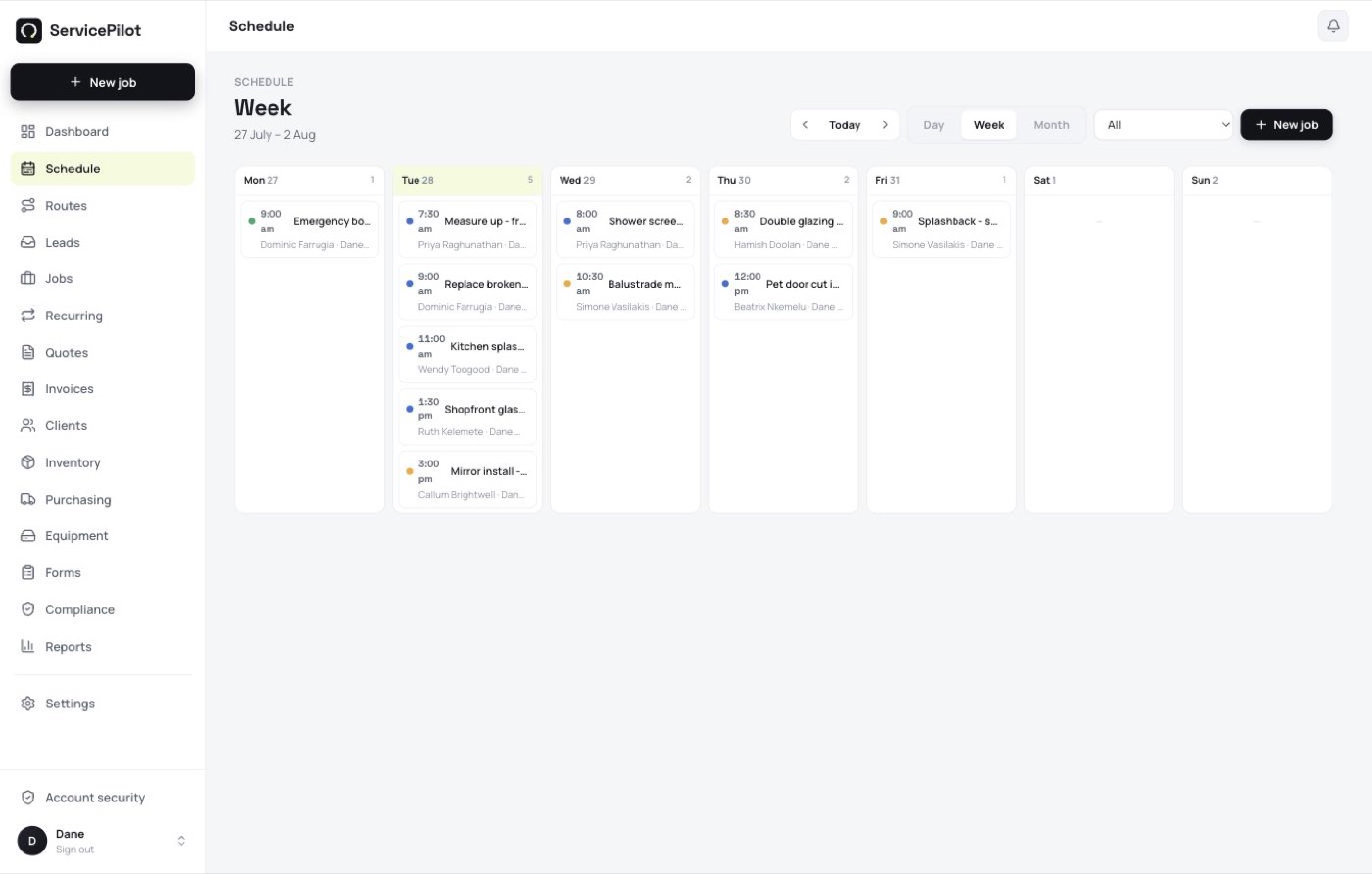
Measure now, fit Thursday
One job, two visits on the calendar. The measure-up photos and sizes travel with it, so the install crew is not ringing the office from the driveway.
Glass on order, job on hold
Park a job while the glass is being cut and it stays visible instead of forgotten. When the order lands, drop the install onto the day.
The whole day on one screen
Drag jobs onto the calendar, assign the van, and see who is where. A board-up at 3pm does not mean rebuilding the afternoon by phone.
Everything a glazing business needs
Fast quoting
Itemised quotes from your price list, sent by SMS or email, accepted online with e-signature.
Scheduling & dispatch
Drag jobs onto the calendar, assign your team and optimise the day’s route.
Invoicing & payments
One-tap invoices with GST, card payments via Stripe straight to your bank, and Xero sync.
SMS reminders & ETAs
Day-before reminders and “on my way” texts cut no-shows and delight customers.
Automated reviews
Ask for a Google review the moment a job’s done - grow your reputation on autopilot.
Client portal
Customers view their quotes, jobs and invoices, pay online and request new work.
Built for the way glass jobs run
How a glass job actually runs in ServicePilot
A glazing job is rarely one visit, and that is the whole problem with putting it in a normal calendar. The measure and the install are days apart, often with different people, and the thing that has to survive the gap is the detail: the sizes, the photos, the access notes, which side the lock is on.
The gap is also where the tracking has to happen. A calendar can tell you that someone is booked on Thursday. It cannot tell you that the glass for Thursday is still at the supplier. Every job in ServicePilot carries a status of its own, so quoted, measured, on order, ready to fit, fitted and invoiced are all things you can filter the board by. The question "what is waiting on glass" is a list, not a ring around the office.
That matters most on the jobs that run long. A shopfront or a full house of windows is one job with a dozen visits attached, not twelve jobs that happen to share an address. The variations, the second measure and the remake hang off the same record, so the history is in one place when the customer queries the invoice four months later.
The other half of it is what the crew carries. The signal in a car park or a half-built house is usually poor, so the apps hold the day on the phone. The fitter reads the measure sheet, changes the status and marks the job done with no reception at all, and the office sees it without being rung.
One thing ServicePilot does not do: it does not schedule a cutting line. If you fabricate your own glass, your factory system keeps that job. This is for the work outside the factory door.
Here is the sequence most glaziers end up running. Nothing here is a special mode. It is the ordinary job screen used twice.
- The call comes in
Raise the job against the customer, or let it come straight off a web form or a missed call. The address and phone are captured once and never typed again. - Book the measure-up
Drop it on the calendar and pick the van. The customer gets a text with the slot, and an "on my way" message on the day. - Measure on site
Take the sizes and the photos on the phone, on the job, including when there is no signal. They save to the job, not to somebody's camera roll. - Order the glass, park the job
Put the job on hold with the order details attached. It stays on the board instead of becoming a note on the dash of the ute. - Check what is waiting, not what is late
Filter the board to jobs on order. That is the list you ring the supplier about on a Monday morning, and it is also the list you book installs from as the glass lands. - Book the install
When the glass lands, drop the second visit on the day. The fitter opens the same job and the measure-up photos and sizes are already there. - Handle the remake without starting again
Glass arrives wrong or breaks on site often enough to plan for. Reopen the job, add the second order and book a refit visit. The original sizes and photos are still attached, so there is no argument later about what was measured. - Invoice before you leave
Turn the finished job into an invoice on the phone, take the card payment on the spot with Tap to Pay, and let it sync to Xero.
More for glaziers
Scheduling glass jobs - questions
Can one job have two visits?+
Yes. Schedule the measure-up and the install as separate visits on the same job. The photos, sizes and notes from the first visit are already there on the second.
What happens while we are waiting on the glass?+
Put the job on hold. It stays on the board with the order details attached, and you schedule the install when the glass arrives.
Can I move a job without ringing the customer?+
Yes. Change the time and the customer is texted the new slot automatically.
Does it work with more than one van?+
Yes. Assign jobs per technician and the board shows each van's day side by side.
Can the fitter see the measure-up photos on site?+
Yes. Photos and notes belong to the job, so whoever opens it on the install sees what was taken at the measure-up. The apps hold the job on the phone, so it still opens with no signal.
How do emergency board-ups fit in?+
Raise the job and drop it on today. The board reflows around it and the crew whose day changed is notified, so you are not ringing three vans to rearrange an afternoon.
Do we need to schedule a job to use it?+
No. A job can sit unscheduled until you know the date. Unscheduled work is its own filter, so it does not quietly disappear.
Can I see which jobs are waiting on glass?+
Yes. Every job carries a status, and jobs on hold waiting on an order are their own list. Open it on a Monday and you have the week's install bookings in front of you, instead of a supplier email thread.
How do you track a glass job that runs over several weeks?+
The job is the record, not the calendar entry. A commercial shopfront holds a dozen visits, the measure sheets and every photo, and still shows as one job with one status.
Does it schedule the cutting table as well?+
No. ServicePilot schedules the crews, the vans and the site visits. It does not run a production line or a cutting optimiser. If you fabricate in-house, keep your factory system for that part.
Can the crew update the job from site?+
Yes. The fitter changes the status, adds photos and marks the job done on the phone, and the office sees it without a phone call. It works with no signal and syncs later.
Does it work on iPhone and Android?+
Both, as real apps rather than a website in a browser. They keep working offline and sync when the phone is back in range.
What does it cost?+
There is a free trial and no credit card is needed to start. Pricing is on the pricing page, in Australian dollars, with GST handled properly.